WhatsApp Müşteri Gruplarına Kişileri Otomatik Ekleme ve Çıkarma
WhatsApp üzerinden satış, duyuru veya kampanya yapan ekipler için doğru kişiyi doğru gruba almak çok önemlidir. Yeni lead geldiğinde onu manuel olarak müşteri grubuna eklemek zaman alır. Daha kötüsü, kişi iletişim almak istemediğini söylediğinde gruptan çıkarılması unutulabilir.
Kişi Modülü Kuralları’na eklenen Add to customer group ve Remove from customer group aksiyonları bu süreci otomatikleştirir.
Bu özellik özellikle WhatsApp broadcast listeleri, kampanya segmentleri, bayi grupları, eğitim duyuruları ve sadakat programları için kullanışlıdır.
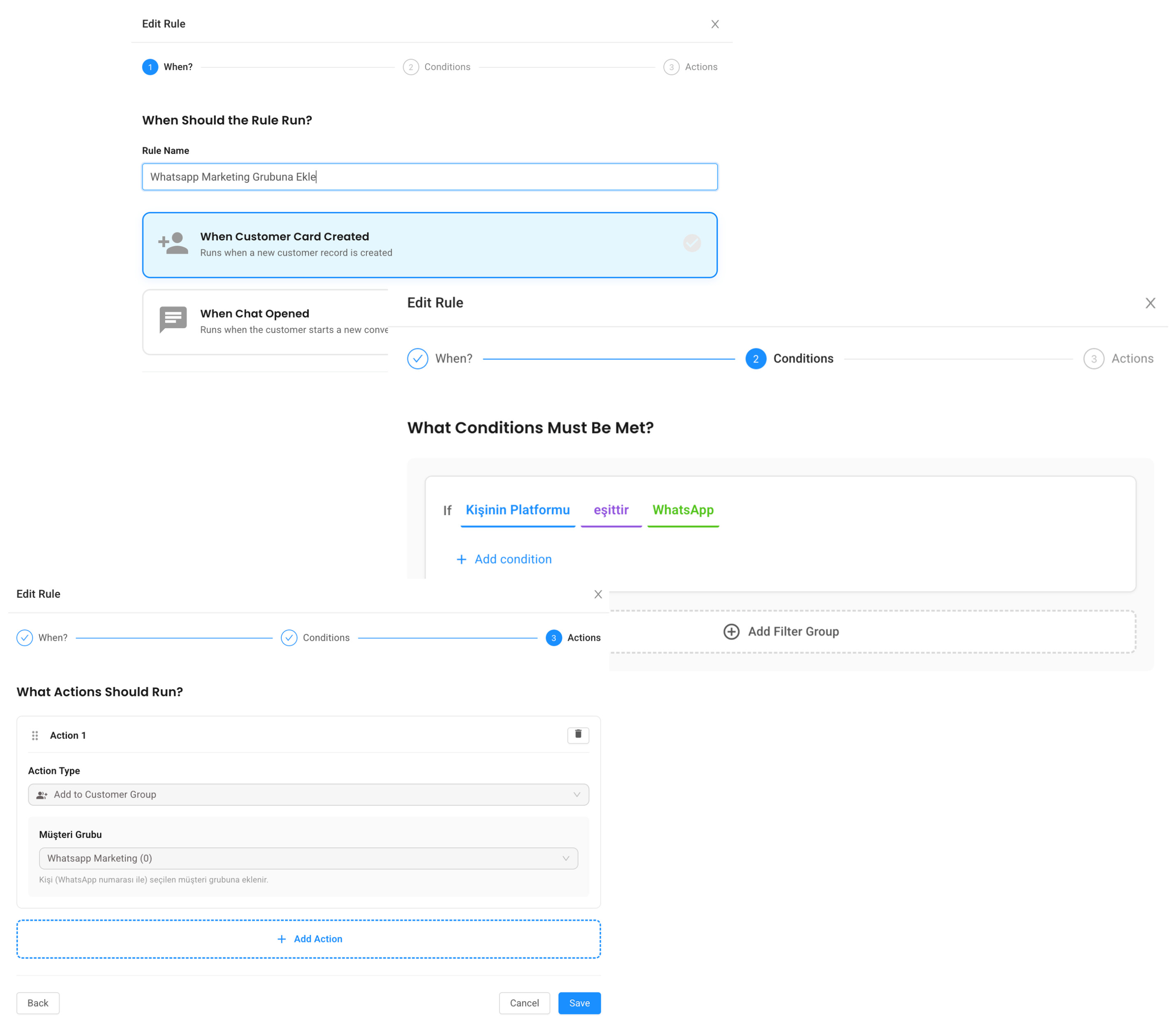
Use case 1: Yeni WhatsApp kişisini kampanya grubuna ekle
Bir müşteri ilk kez WhatsApp’tan yazdığında, onu otomatik olarak ilgili müşteri grubuna ekleyebilirsiniz.
When: Contact Created

If:

Kişinin Platformu equals WhatsApp

Action: Add to customer group

Customer group: Yeni WhatsApp Leadleri
Bu kural sayesinde ekip kişinin numarasını manuel taşımak zorunda kalmaz. Yeni lead, seçilen WhatsApp müşteri grubuna otomatik eklenir.
Use case 2: İlk mesajına göre farklı gruba ekle
Herkesi aynı gruba almak her zaman doğru değildir. Müşterinin ilk mesajı, niyetini anlamak için iyi bir sinyaldir.
Örneğin demo isteyenleri ayrı bir gruba alabilirsiniz:
When: Chat Opened

If:

Kişinin Platformu equals WhatsApp

AND Son Konuşma İlk Mesajı contains demo

Action: Add to customer group

Customer group: Demo İsteyenler
Fiyat soranları başka bir gruba alabilirsiniz:
When: Chat Opened

If:

Kişinin Platformu equals WhatsApp

AND Son Konuşma İlk Mesajı contains fiyat

Action: Add to customer group

Customer group: Fiyat Talebi Olanlar
Bu yapı pazarlama ve satış ekiplerinin daha doğru segmentlerle çalışmasını sağlar.
Use case 3: İletişim istemeyen kişiyi gruptan çıkar
Bir kişi “DUR”, “STOP” veya “mesaj istemiyorum” yazdığında onu sadece suppression listesine eklemek yetmeyebilir. Aynı zamanda WhatsApp müşteri grubundan da çıkarmak isteyebilirsiniz.
When: Chat Opened

If:

Son Konuşma İlk Mesajı contains DUR

OR Son Konuşma İlk Mesajı contains STOP

OR Son Konuşma İlk Mesajı contains mesaj istemiyorum

Action 1: Remove from customer group

Customer group: Kampanya Listesi

Action 2: Add to suppression list

Suppression direction: Outbound

Action 3: Send text message

Message: Talebinizi aldık. Sizi kampanya listemizden çıkardık.
Bu akış daha temiz bir izin yönetimi sağlar.
Use case 4: Etikete göre grup yönetimi
Kişi etiketleriyle müşteri gruplarını birlikte kullanabilirsiniz.
Örneğin satış temsilcisi bir kişiye VIP etiketi verdiğinde:
When: Contact Created

If:

Kişinin Etiketleri contains VIP

Action: Add to customer group

Customer group: VIP Müşteriler
Veya kişi artık aktif müşteri değilse:
When: Contact Created

If:

Kişinin Etiketleri contains Pasif

Action: Remove from customer group

Customer group: Aktif Müşteriler
Bu yapı manuel liste yönetimini azaltır.
Bu özellik ne kazandırır?
WhatsApp müşteri grupları doğru yönetildiğinde kampanyalar daha hedefli olur. Herkese aynı mesajı göndermek yerine, kişinin niyetine ve durumuna göre segment oluşturabilirsiniz.
Örneğin:
-
Demo isteyenler
-
Fiyat soranlar
-
VIP müşteriler
-
Eğitim duyurusu alacaklar
-
Kampanya izni olanlar
-
Abonelikten çıkanlar
Bu segmentler daha sonra broadcast, duyuru ve takip süreçlerinde kullanılabilir.
Dikkat edilmesi gerekenler
Müşteri grupları özellikle iletişim izniyle birlikte düşünülmelidir. Bir kişiyi gruba eklemek, o kişiye her zaman mesaj göndermek anlamına gelmemelidir. İzin yönetimi için suppression listesi ve etiketlerle birlikte çalışmak daha güvenlidir.
Ayrıca grupların adlarını operasyonel olarak anlaşılır tutmak önemlidir. “Kampanya 1” yerine “2026 Haziran Demo Talebi” gibi açık isimler ileride raporlama ve yönetimi kolaylaştırır.
Özet
Add to customer group ve Remove from customer group aksiyonları, WhatsApp kişi listelerini otomatik ve düzenli tutar. Yeni lead’leri doğru segmente almak, iletişim istemeyenleri listeden çıkarmak ve pazarlama operasyonunu temiz yönetmek için güçlü bir çözümdür.
Supsis AI ile bu akışı kendi WhatsApp operasyonunuzda görmek isterseniz demo talebi bırakabilirsiniz:
Automatically Add and Remove Contacts from WhatsApp Customer Groups
For teams that use WhatsApp for sales, announcements, or campaigns, adding the right contact to the right group is important. Manually adding every new lead takes time. Even worse, when someone says they no longer want messages, removing them from the group may be forgotten.
The new Add to customer group and Remove from customer group actions in Contact Module Rules automate this process.
This is useful for WhatsApp broadcast lists, campaign segments, dealer groups, education announcements, and loyalty programs.
Use case 1: add a new WhatsApp contact to a campaign group
When a customer writes from WhatsApp for the first time, you can automatically add them to the relevant customer group.
When: Contact Created

If:

Contact Platform equals WhatsApp

Action: Add to customer group

Customer group: New WhatsApp Leads
With this rule, the team does not need to move the number manually. The new lead is automatically added to the selected WhatsApp customer group.
Use case 2: add to different groups based on the first message
Adding everyone to the same group is not always ideal. The customer’s first message is a good signal of intent.
For example, you can group demo requests separately:
When: Chat Opened

If:

Contact Platform equals WhatsApp

AND Last Conversation First Message contains demo

Action: Add to customer group

Customer group: Demo Requests
And pricing requests separately:
When: Chat Opened

If:

Contact Platform equals WhatsApp

AND Last Conversation First Message contains pricing

Action: Add to customer group

Customer group: Pricing Requests
This helps marketing and sales teams work with more accurate segments.
Use case 3: remove opt-out contacts from a group
When someone writes “STOP” or “do not message me”, adding them to a suppression list may not be enough. You may also want to remove them from the WhatsApp customer group.
When: Chat Opened

If:

Last Conversation First Message contains STOP

OR Last Conversation First Message contains do not message me

Action 1: Remove from customer group

Customer group: Campaign List

Action 2: Add to suppression list

Suppression direction: Outbound

Action 3: Send text message

Message: We received your request. We removed you from our campaign list.
This creates cleaner permission management.
Use case 4: manage groups based on tags
You can use contact tags together with customer groups.
For example, when a sales agent tags a contact as VIP:
When: Contact Created

If:

Contact Tags contains VIP

Action: Add to customer group

Customer group: VIP Customers
Or if a contact is no longer active:
When: Contact Created

If:

Contact Tags contains Passive

Action: Remove from customer group

Customer group: Active Customers
This reduces manual list management.
What does this feature improve?
When WhatsApp customer groups are managed correctly, campaigns become more targeted. Instead of sending the same message to everyone, you can segment contacts by intent and status.
Examples:
-
Demo requests
-
Pricing requests
-
VIP customers
-
Education announcement recipients
-
Campaign-permitted contacts
-
Opted-out contacts
These segments can later be used for broadcasts, announcements, and follow-up processes.
Things to keep in mind
Customer groups should be considered together with communication permissions. Adding someone to a group should not automatically mean they should always receive messages. For safer permission management, use suppression lists and tags together.
Also, keep group names operationally clear. Instead of “Campaign 1”, use names like “June 2026 Demo Requests”. This makes future reporting and management easier.
Summary
The Add to customer group and Remove from customer group actions keep WhatsApp contact lists organized automatically. They are powerful for segmenting new leads, removing opt-out contacts, and managing marketing operations cleanly.
You can request a demo to see this flow in your own WhatsApp operation: