Chat Açıldığında Otomatik Karşılama Mesajı Gönderme
Müşteri bir sohbet başlattığında ilk birkaç saniye çok önemlidir. O anda panelde uygun temsilci olmayabilir, ekip başka bir görüşmede olabilir veya yoğun saatlerde sohbetler sıraya girebilir. Müşteri ise genellikle şunu bilmek ister: “Mesajım ulaştı mı? Biri benimle ilgilenecek mi?”
Kişi Modülü Kuralları’na eklenen Send text message aksiyonu tam bu noktada işe yarar. Chat açılır açılmaz müşteriye otomatik bir karşılama mesajı gönderebilirsiniz.
Eskiden bu senaryoyu yapmak için Supsis API kullanmak, otomasyon tarafında akış kurmak veya teknik destek almak gerekebilirdi. Artık basit bir kural ile ücretsiz ve kolay şekilde yapılabilir.
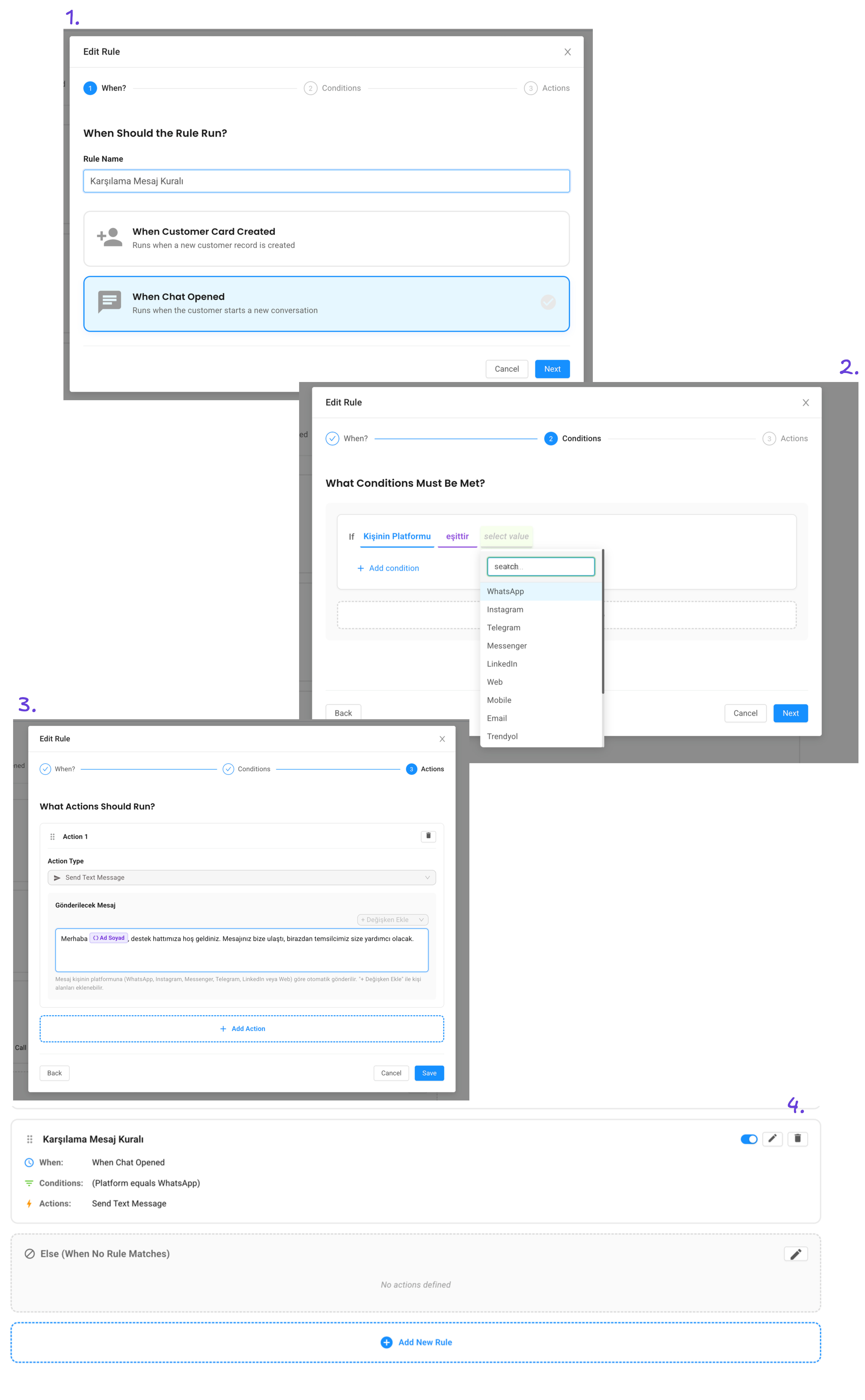
Use case: Her yeni sohbete sıcak bir karşılama mesajı
En basit kural şöyle kurulabilir:
When: Chat Opened

If: no condition

Action: Send text message

Message: Merhaba {{contact.fullname}}, destek hattımıza hoş geldiniz. Mesajınız bize ulaştı, birazdan temsilcimiz size yardımcı olacak.
Bu kuralda koşul yoktur. Yani hangi kanaldan gelirse gelsin, yeni sohbet açıldığında mesaj gönderilir.
{{contact.fullname}} alanı otomatik doldurulur. Kişinin adı kayıtlıysa mesaj kişiselleşir. Kişinin adı yoksa mesaj yine çalışır, sadece isim alanı boş kalır.
Neden faydalı?
Bu küçük mesaj müşteri deneyimini ciddi şekilde iyileştirir.
Müşteri mesajının ulaştığını görür. Beklerken belirsizlik yaşamaz. Temsilci bağlanmadan önce marka daha profesyonel görünür. Ekip yoğun olsa bile ilk temas kaçırılmaz.
Özellikle şu işletmeler için çok kullanışlıdır:
-
E-ticaret siteleri
-
Klinikler ve randevu alan işletmeler
-
Eğitim kurumları
-
Turizm ve otel işletmeleri
-
B2B satış ekipleri
-
Teknik destek ekipleri
Daha iyi bir mesaj nasıl yazılır?
Karşılama mesajı çok uzun olmamalı. Müşteriye üç şeyi söylemesi yeterlidir:
-
Mesaj ulaştı.
-
Doğru yerdesiniz.
-
Bir temsilci birazdan yardımcı olacak.
Örnek:
Merhaba {{contact.fullname}}, Supsis destek hattına hoş geldiniz. Mesajınız bize ulaştı. Uygun ilk temsilcimiz birazdan sorularınızı yanıtlayacak.
Satış ekibi için örnek:
Merhaba {{contact.fullname}}, demo talebinizi aldık. Satış ekibimiz birazdan sizinle ilgilenecek.
Destek ekibi için örnek:
Merhaba {{contact.fullname}}, destek talebiniz bize ulaştı. Sorunu daha hızlı çözebilmemiz için lütfen ekran görüntüsü veya sipariş numarası paylaşabilirsiniz.
Kanal bazlı karşılama mesajı
İsterseniz koşul ekleyerek her kanal için farklı mesaj yazabilirsiniz.
WhatsApp için:
When: Chat Opened

If: Kişinin Platformu equals WhatsApp

Action: Send text message

Message: Merhaba {{contact.fullname}}, WhatsApp destek hattımıza hoş geldiniz. Mesajınız alındı.
Web chat için:
When: Chat Opened

If: Kişinin Platformu equals Web

Action: Send text message

Message: Merhaba, web sitemiz üzerinden bize ulaştığınız için teşekkürler. Birazdan size yardımcı olacağız.
Böylece her kanalın tonunu ayrı yönetebilirsiniz.
İlk mesaj içeriğine göre karşılama
Yeni koşullardan biri de son konuşmanın ilk mesajını kontrol etmektir. Bu sayede müşterinin yazdığı ilk cümleye göre farklı mesajlar gönderebilirsiniz.
Örnek:
When: Chat Opened

If: Son Konuşma İlk Mesajı contains fiyat

Action: Send text message

Message: Merhaba {{contact.fullname}}, fiyat bilgisi talebinizi aldık. Satış ekibimiz size en uygun paketleri paylaşacak.
Başka bir örnek:
When: Chat Opened

If: Son Konuşma İlk Mesajı contains destek

Action: Send text message

Message: Merhaba {{contact.fullname}}, destek talebinizi aldık. Ekibimiz sorununuzu inceleyip size dönüş yapacak.
Bu yaklaşım müşteriye “beni anladılar” hissi verir.
Dikkat edilmesi gerekenler
Karşılama mesajını çok sık ve gereksiz göndermemek önemlidir. Özellikle aynı müşterinin kısa süre içinde birden fazla sohbet açtığı durumlarda mesajın tonu rahatsız edici olmamalıdır.
İyi karşılama mesajı kısa, net ve gerçekçidir. “Hemen dönüyoruz” diyorsanız gerçekten hızlı dönmeye çalışın. Yoğun saatlerde “birazdan” veya “uygun ilk temsilcimiz” gibi daha güvenli ifadeler kullanabilirsiniz.
Özet
Send text message aksiyonu, müşteriyle ilk temasın otomatik ve profesyonel olmasını sağlar. API yazmadan, otomasyon paketi kurmadan, sadece Kişi Modülü Kuralları ile karşılama mesajı oluşturabilirsiniz.
Supsis AI ile bu akışı kendi işletmenizde görmek isterseniz demo talebi bırakabilirsiniz:
Send an Automatic Greeting Message When a Chat Opens
The first few seconds after a customer starts a chat matter a lot. An agent may not be available immediately, the team may be busy, or conversations may queue up during peak hours. The customer usually wants to know one thing: “Did my message reach you? Will someone help me?”
The new Send text message action in Contact Module Rules solves exactly this. As soon as a chat opens, you can send an automatic greeting message to the customer.
Previously, this kind of flow might require the Supsis API, an automation workflow, or technical support. Now it can be done with a simple rule.
Use case: a warm greeting for every new chat
The simplest rule looks like this:
When: Chat Opened

If: no condition

Action: Send text message

Message: Hello {{contact.fullname}}, welcome to our support line. We received your message, and one of our agents will help you shortly.
There is no condition in this rule. No matter which channel the customer uses, the message is sent when the chat opens.
{{contact.fullname}} is filled automatically. If the contact name exists, the message becomes personal. If not, the rule still works.
Why is this useful?
This small message can improve the customer experience significantly.
The customer knows the message was received. There is less uncertainty while waiting. The brand looks more professional before an agent joins. Even when the team is busy, the first touch is not missed.
It is especially useful for:
-
E-commerce websites
-
Clinics and appointment-based businesses
-
Education companies
-
Hotels and tourism teams
-
B2B sales teams
-
Technical support teams
How to write a better greeting
A greeting message should not be too long. It should tell the customer three things:
-
The message was received.
-
They are in the right place.
-
An agent will help shortly.
Example:
Hello {{contact.fullname}}, welcome to Supsis support. We received your message. The first available agent will answer your questions shortly.
For sales:
Hello {{contact.fullname}}, we received your demo request. Our sales team will help you shortly.
For support:
Hello {{contact.fullname}}, we received your support request. To help us solve it faster, you can share a screenshot or order number.
Channel-based greeting messages
You can add conditions and write different messages for different channels.
For WhatsApp:
When: Chat Opened

If: Contact Platform equals WhatsApp

Action: Send text message

Message: Hello {{contact.fullname}}, welcome to our WhatsApp support line. Your message has been received.
For web chat:
When: Chat Opened

If: Contact Platform equals Web

Action: Send text message

Message: Hello, thank you for contacting us through our website. We will help you shortly.
This lets you manage the tone of each channel separately.
Greeting based on the first message
One of the new conditions checks the first message of the latest conversation. This lets you send different replies based on what the customer wrote first.
Example:
When: Chat Opened

If: Last Conversation First Message contains pricing

Action: Send text message

Message: Hello {{contact.fullname}}, we received your pricing request. Our sales team will share the most suitable options with you.
Another example:
When: Chat Opened

If: Last Conversation First Message contains support

Action: Send text message

Message: Hello {{contact.fullname}}, we received your support request. Our team will review the issue and get back to you.
This makes the customer feel understood from the first message.
Things to keep in mind
Avoid sending unnecessary greetings too often. If the same customer opens several chats in a short time, the message should not feel robotic or annoying.
A good greeting is short, clear, and realistic. If you say “we will reply immediately”, make sure your team can actually do that. During busy hours, phrases like “shortly” or “the first available agent” are safer.
Summary
The Send text message action makes the first customer touch automatic and professional. You can create a greeting message using Contact Module Rules without writing API code or building an automation flow.
You can request a demo to see this flow in your own business: