Mesai Dışında Gelen Sohbetleri Otomatik Chatbot’a Yönlendirme
Müşteriler sadece mesai saatlerinde yazmaz. Gece, hafta sonu veya tatil günlerinde de fiyat sorabilir, destek isteyebilir, randevu talep edebilir. Temsilci yoksa müşteri bekler; beklerken de başka bir firmaya gidebilir.
Kişi Modülü Kuralları’na eklenen Forward to chatbot aksiyonu ile belirli koşullarda sohbeti otomatik olarak chatbot’a yönlendirebilirsiniz.
Bu özellik özellikle mesai dışı karşılama, ön bilgi toplama, sık sorulan soruları yanıtlama ve acil olmayan talepleri sınıflandırma için çok kullanışlıdır.
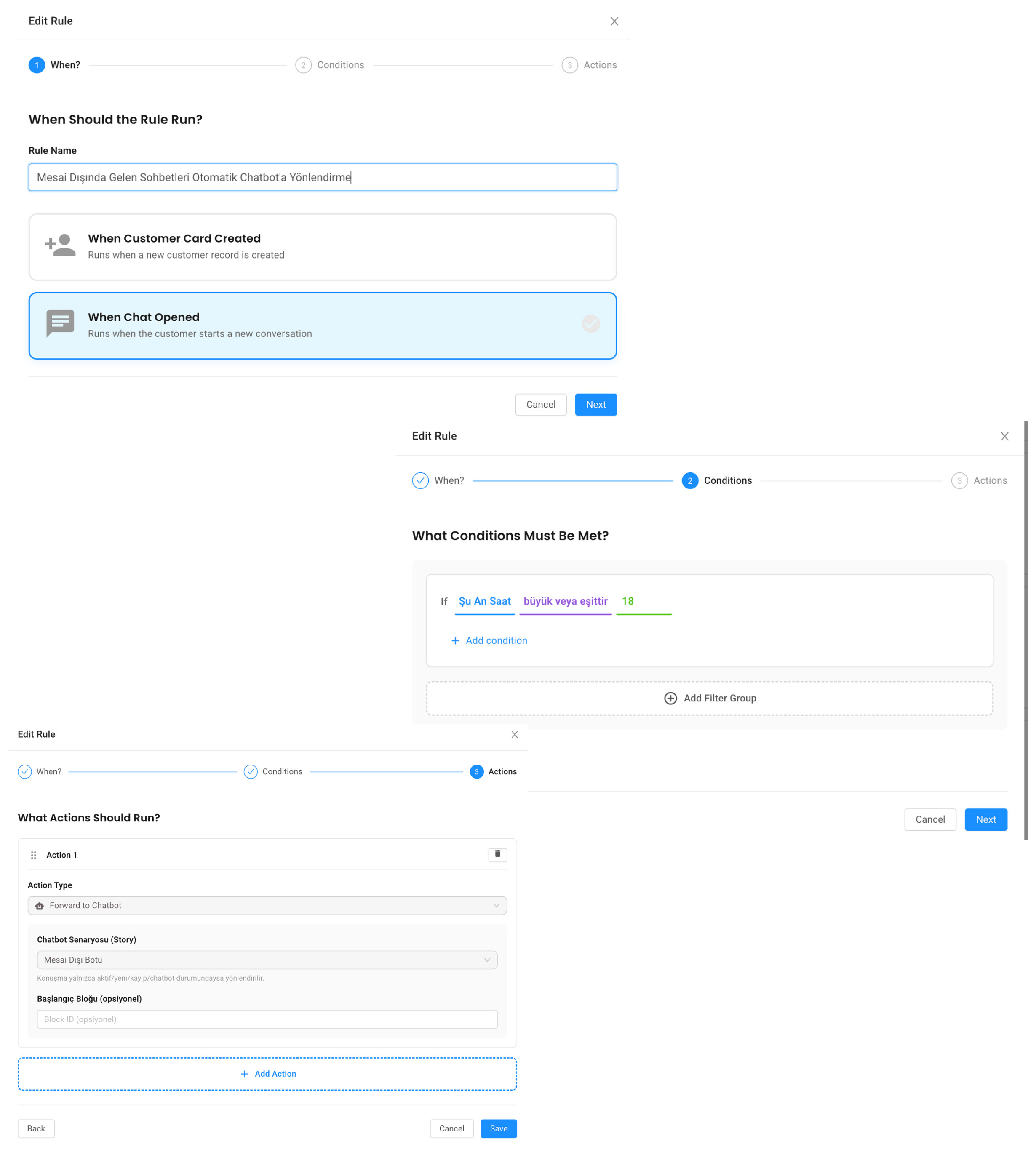
Use case 1: Mesai dışında tüm sohbetleri chatbot’a yönlendir
En temel senaryo mesai dışı yönlendirmedir.
When: Chat Opened

If:

Şu An Saat greater than 18

Action: Forward to chatbot

Chatbot: Mesai Dışı Karşılama Botu
Sabah saatleri için ayrı bir kural da kurulabilir:
When: Chat Opened

If:

Şu An Saat less than 9

Action: Forward to chatbot

Chatbot: Mesai Dışı Karşılama Botu
Bu şekilde temsilci yokken müşteri tamamen cevapsız kalmaz.
Chatbot ne yapabilir?
Mesai dışı chatbot sadece “şu an kapalıyız” demek zorunda değildir. Daha faydalı bir akış kurabilirsiniz.
Örneğin chatbot şu bilgileri toplayabilir:
-
Ad soyad
-
Telefon veya e-posta
-
Talep konusu
-
Sipariş numarası
-
Aciliyet seviyesi
-
Demo veya fiyat talebi
Sonra müşteriye net bir beklenti verebilir:
Talebinizi aldık. Ekibimiz mesai başladığında sizinle iletişime geçecek.
Use case 2: Sahibi offline ise chatbot’a yönlendir
Bazı durumlarda müşterinin sahibi vardır ama o temsilci offline’dır. Müşteriyi bekletmek yerine önce chatbot ile bilgi toplayabilirsiniz.
When: Chat Opened

If:

Kişinin Sahibi Var mı equals Evet

AND Kişinin Sahibi Online mı equals Hayır

Action: Forward to chatbot

Chatbot: Ön Bilgi Toplama Botu
Bu senaryo özellikle destek ekiplerinde faydalıdır. Temsilci online olduğunda konuşmaya daha fazla bilgiyle başlar.
Use case 3: İlk mesajına göre farklı chatbot’a yönlendir
Müşterinin ilk mesajı niyetini gösterebilir. Buna göre farklı botlara yönlendirme yapılabilir.
Satış için:
When: Chat Opened

If:

Son Konuşma İlk Mesajı contains demo

OR Son Konuşma İlk Mesajı contains fiyat

Action: Forward to chatbot

Chatbot: Satış Ön Görüşme Botu
Destek için:
When: Chat Opened

If:

Son Konuşma İlk Mesajı contains destek

OR Son Konuşma İlk Mesajı contains hata

Action: Forward to chatbot

Chatbot: Destek Bilgi Toplama Botu
Böylece her müşteriye aynı bot değil, niyetine uygun bot çalışır.
Use case 4: Hafta sonu gelenleri chatbot’a al
Gün koşulu kullanarak hafta sonu akışı oluşturabilirsiniz.
When: Chat Opened

If:

Şu An Gün equals 0

OR Şu An Gün equals 6

Action: Forward to chatbot

Chatbot: Hafta Sonu Botu
Bu kural Cumartesi ve Pazar günleri gelen sohbetleri otomatik karşılar.
İyi bir mesai dışı bot nasıl olmalı?
İyi bir mesai dışı bot kısa ve dürüst olmalıdır.
Müşteriye temsilci varmış gibi davranmamalıdır. Bunun yerine durumu net söylemeli, talebi toplamalı ve sonraki adımı açıklamalıdır.
Örnek mesaj:
Merhaba, şu anda mesai saatleri dışındayız. Talebinizi alıp ilgili ekibe ileteceğim. Lütfen size yardımcı olabilmemiz için konuyu kısaca anlatın.
Bu yaklaşım güven verir ve beklentiyi doğru yönetir.
Chatbot yönlendirme ile karşılama mesajı birlikte kullanılabilir mi?
Evet. Bazı işletmeler önce kısa bir metin mesajı gönderir, sonra chatbot’a yönlendirir.
When: Chat Opened

If: Şu An Saat greater than 18

Action 1: Send text message

Message: Merhaba {{contact.fullname}}, şu anda mesai saatleri dışındayız. Size birkaç soru sorarak talebinizi alacağım.

Action 2: Forward to chatbot

Chatbot: Mesai Dışı Karşılama Botu
Bu akış daha doğal bir başlangıç sağlar.
Dikkat edilmesi gerekenler
Forward to chatbot aksiyonu sohbet açıldığında kullanılan bir aksiyondur. Çünkü chatbot yönlendirme aktif konuşma bağlamında anlamlıdır.
Ayrıca botun sonunda müşteriye ne olacağını söylemek önemlidir. “Talebiniz alındı” demek yeterli değildir; ne zaman dönüş yapılacağı veya hangi ekibe iletildiği belirtilirse deneyim daha iyi olur.
Özet
Forward to chatbot aksiyonu, temsilci olmadığında bile müşteriyi cevapsız bırakmaz. Mesai dışı karşılama, ön bilgi toplama, satış/destek ayrımı ve hafta sonu yönlendirme gibi süreçleri kod yazmadan kurabilirsiniz.
Supsis AI ile chatbot yönlendirme akışını kendi işletmenizde görmek isterseniz demo talebi bırakabilirsiniz:
Automatically Forward After-Hours Chats to a Chatbot
Customers do not only write during business hours. They may ask for pricing, request support, or book an appointment at night, on weekends, or during holidays. If no agent is available, the customer waits. While waiting, they may choose another company.
The new Forward to chatbot action in Contact Module Rules lets you automatically forward conversations to a chatbot under specific conditions.
This is especially useful for after-hours greeting, collecting initial information, answering common questions, and classifying non-urgent requests.
Use case 1: forward all after-hours chats to a chatbot
The most basic scenario is after-hours routing.
When: Chat Opened

If:

Current Hour greater than 18

Action: Forward to chatbot

Chatbot: After-Hours Greeting Bot
You can also create a morning rule:
When: Chat Opened

If:

Current Hour less than 9

Action: Forward to chatbot

Chatbot: After-Hours Greeting Bot
This prevents customers from being completely unanswered when no agent is available.
What can the chatbot do?
An after-hours chatbot does not have to only say “we are closed”. You can build a more useful flow.
For example, the chatbot can collect:
-
Full name
-
Phone or email
-
Request topic
-
Order number
-
Urgency level
-
Demo or pricing request
Then it can set a clear expectation:
We received your request. Our team will contact you when business hours start.
Use case 2: forward to chatbot when the owner is offline
Sometimes a customer has an owner, but that agent is offline. Instead of making the customer wait, you can collect information with a chatbot first.
When: Chat Opened

If:

Contact Owner Exists equals Yes

AND Contact Owner Is Online equals No

Action: Forward to chatbot

Chatbot: Initial Information Bot
This is especially useful for support teams. When the agent comes online, they start with more context.
Use case 3: forward to different chatbots based on the first message
The customer’s first message can show intent. You can route to different bots based on that intent.
For sales:
When: Chat Opened

If:

Last Conversation First Message contains demo

OR Last Conversation First Message contains pricing

Action: Forward to chatbot

Chatbot: Sales Qualification Bot
For support:
When: Chat Opened

If:

Last Conversation First Message contains support

OR Last Conversation First Message contains error

Action: Forward to chatbot

Chatbot: Support Information Bot
This means every customer does not see the same bot. They see a bot that matches their intent.
Use case 4: route weekend chats to a chatbot
You can use the day condition to create a weekend flow.
When: Chat Opened

If:

Current Day equals 0

OR Current Day equals 6

Action: Forward to chatbot

Chatbot: Weekend Bot
This automatically handles chats coming on Saturday and Sunday.
What makes a good after-hours bot?
A good after-hours bot should be short and honest.
It should not pretend that a human agent is available. Instead, it should explain the situation, collect the request, and tell the customer what happens next.
Example message:
Hello, we are currently outside business hours. I will collect your request and forward it to the relevant team. Please briefly describe how we can help you.
This builds trust and manages expectations correctly.
Can chatbot forwarding be combined with a greeting message?
Yes. Some businesses first send a short text message, then forward to a chatbot.
When: Chat Opened

If: Current Hour greater than 18

Action 1: Send text message

Message: Hello {{contact.fullname}}, we are currently outside business hours. I will ask a few questions to collect your request.

Action 2: Forward to chatbot

Chatbot: After-Hours Greeting Bot
This creates a more natural start.
Things to keep in mind
The Forward to chatbot action is used when a chat opens, because chatbot routing makes sense in an active conversation context.
Also, the bot should tell the customer what happens at the end. “Your request has been received” is useful, but it is better to say when the team will reply or which team will handle it.
Summary
The Forward to chatbot action prevents customers from being unanswered when no agent is available. You can build after-hours greeting, initial information collection, sales/support separation, and weekend routing without writing code.
You can request a demo to see chatbot routing in your own business: