Kişi Modülü Kuralları ile Webhook Aksiyonu ile Supsis’ten Dış Sistemlere Otomatik Bilgi Gönderme
Müşteri operasyonu çoğu zaman tek panelde bitmez. Supsis AI içinde yeni bir lead oluşur ama satış CRM’i başka yerde olabilir. Bir destek talebi gelir ama teknik ekibin takip sistemi farklı olabilir. Bir VIP müşteri yazdığında Slack kanalına bildirim düşmesi gerekebilir.
Kişi Modülü Kuralları’na eklenen Call webhook aksiyonu, Supsis içinde gerçekleşen kişi ve sohbet olaylarını dış sistemlere aktarmanızı sağlar.
Bu aksiyon teknik ekipler için çok güçlüdür; teknik olmayan ekipler içinse hazır webhook URL’si verildiğinde kolayca kullanılabilir.
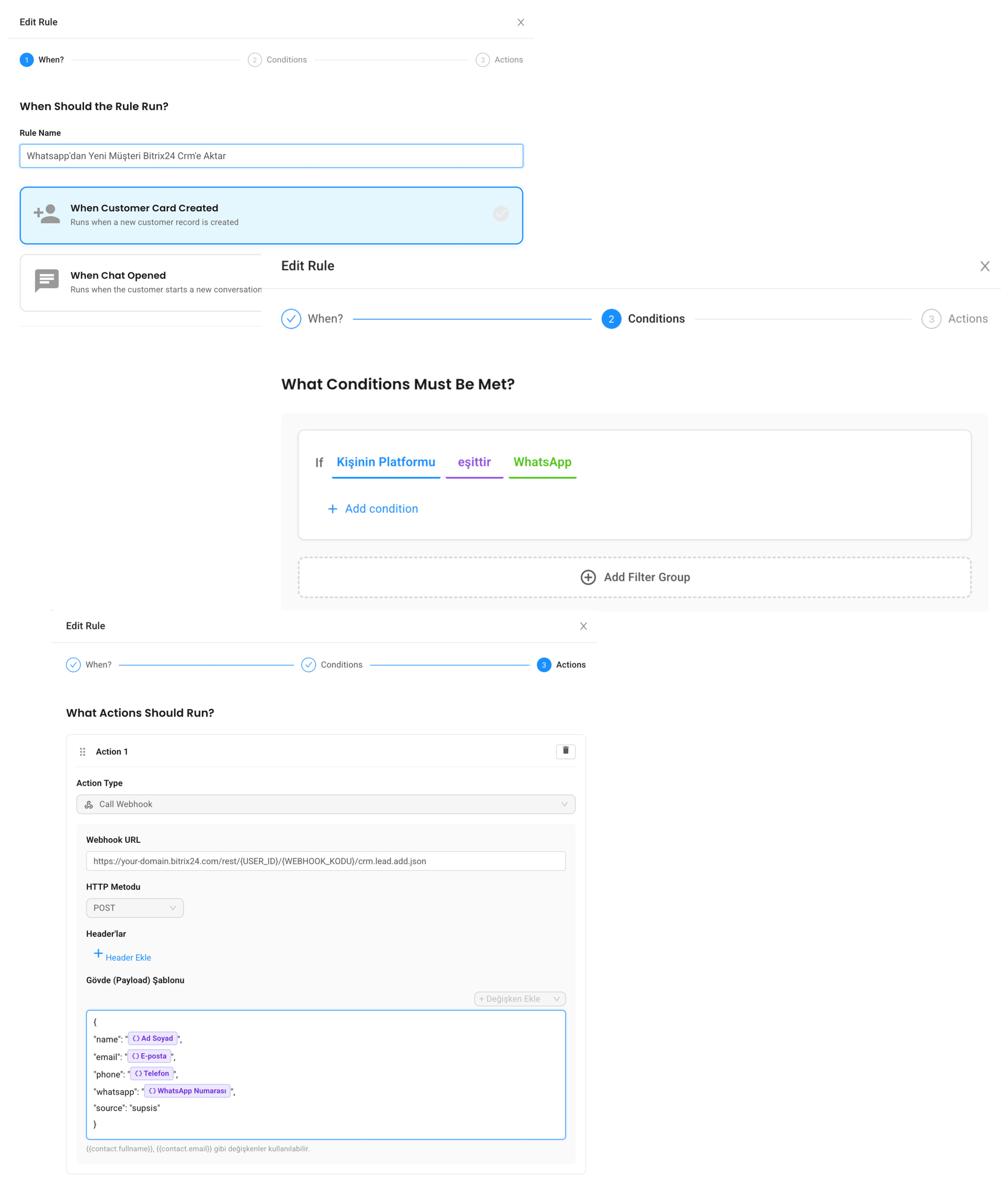
Webhook nedir?
Webhook, bir sistemde olay olduğunda başka bir sisteme otomatik HTTP isteği gönderme yöntemidir.
Basitçe şöyle düşünebilirsiniz:
Supsis'te yeni kişi oluştu -> Webhook çalıştı -> CRM'e lead kaydı gönderildi
Ya da:
VIP müşteri sohbet açtı -> Webhook çalıştı -> Slack kanalına bildirim gitti
Use case 1: Yeni lead’i CRM’e gönder
Satış ekiplerinde en yaygın ihtiyaçlardan biri Supsis’e gelen lead’i CRM’e taşımaktır.
When: Contact Created

If:

Son Konuşma İlk Mesajı contains demo

OR Son Konuşma İlk Mesajı contains fiyat

Action: Call webhook

URL: https://crm.example.com/webhooks/supsis-lead

Method: POST

Payload:

{

"name": "{{contact.fullname}}",

"email": "{{contact.email}}",

"phone": "{{contact.phone}}",

"whatsapp": "{{contact.whatsappNumber}}",

"source": "supsis"

}
Bu akışta satış temsilcisi Supsis panelinde konuşmaya devam ederken, CRM tarafında da lead kaydı açılır.
Use case 2: VIP müşteri yazınca Slack’e bildirim gönder
Bazı müşteriler için hızlı dönüş kritik olabilir. VIP bir kişi sohbet açtığında ilgili ekibe anlık bildirim gönderebilirsiniz.
When: Chat Opened

If:

Kişinin Etiketleri contains VIP

Action: Call webhook

URL: https://hooks.slack.com/services/...

Method: POST

Payload:

{

"text": "VIP müşteri {{contact.fullname}} Supsis üzerinden yeni sohbet açtı."

}
Bu sayede ekip Supsis panelini sürekli kontrol etmese bile önemli müşterileri kaçırmaz.
Use case 3: Destek talebini ticket sistemine taşı
Destek ekipleri Jira, Linear, Zendesk, Freshdesk veya özel bir ticket sistemi kullanıyor olabilir. Supsis’te gelen destek taleplerini bu sistemlere göndermek için webhook kullanılabilir.
When: Chat Opened

If:

Son Konuşma İlk Mesajı contains hata

OR Son Konuşma İlk Mesajı contains çalışmıyor

OR Son Konuşma İlk Mesajı contains destek

Action: Call webhook

URL: https://support.example.com/api/tickets

Method: POST

Payload:

{

"customerName": "{{contact.fullname}}",

"customerEmail": "{{contact.email}}",

"messageType": "support_request",

"source": "supsis"

}
Bu yapı destek süreçlerinin Supsis dışındaki sistemlerle senkron kalmasını sağlar.
Use case 4: Raporlama sistemine olay gönder
Bazı işletmeler kendi veri ambarına veya raporlama sistemine olay göndermek ister. Örneğin her yeni WhatsApp lead’i bir analytics endpoint’ine gönderilebilir.
When: Contact Created

If:

Kişinin Platformu equals WhatsApp

Action: Call webhook

URL: https://analytics.example.com/events

Method: POST

Payload:

{

"event": "new_whatsapp_lead",

"contact": "{{contact.fullname}}",

"phone": "{{contact.whatsappNumber}}"

}
Bu sayede Supsis operasyonu raporlama tarafında da görünür hale gelir.
Webhook kullanırken nelere dikkat edilmeli?
Webhook güçlüdür ama dikkatli tasarlanmalıdır.
Öncelikle webhook URL’si güvenli olmalıdır. Herkese açık, doğrulamasız ve sınırsız veri kabul eden endpoint’ler risk oluşturabilir.
İkinci olarak payload sade tutulmalıdır. Dış sistemin gerçekten ihtiyaç duymadığı kişisel verileri göndermeyin.
Üçüncü olarak başarısızlık senaryosunu düşünün. Dış sistem geçici olarak kapalı olabilir. Bu yüzden kritik süreçlerde webhook tarafında loglama ve tekrar deneme mekanizması tasarlamak iyi olur.
Teknik olmayan ekipler nasıl kullanabilir?
Teknik ekip webhook URL’sini ve örnek payload’ı hazırladıktan sonra operasyon ekibi kuralı panelden yönetebilir.
Örneğin operasyon ekibi sadece şunları değiştirir:
-
Hangi koşulda çalışacağı
-
Hangi etiket veya kanal için çalışacağı
-
Hangi mesaj içeriğine göre tetikleneceği
Teknik entegrasyon sabit kalır, iş kuralı panelden yönetilir.
Özet
Call webhook aksiyonu, Supsis AI’ı dış sistemlerle bağlayan pratik bir köprüdür. Yeni lead’i CRM’e göndermek, VIP müşteriyi Slack’e bildirmek, destek talebini ticket sistemine taşımak veya raporlama sistemine olay aktarmak için kullanılabilir.
Supsis AI ile webhook entegrasyonlarını kendi operasyonunuzda görmek isterseniz demo talebi bırakabilirsiniz:
Send Information from Supsis to External Systems with Webhooks
Customer operations often do not end in a single panel. A new lead may arrive in Supsis AI, but the sales CRM may be somewhere else. A support request may come in, but the technical team may track work in another system. When a VIP customer writes, a Slack notification may be needed.
The new Call webhook action in Contact Module Rules lets you send contact and chat events from Supsis to external systems.
This action is very powerful for technical teams. For non-technical teams, it becomes easy to use once a webhook URL is prepared.
What is a webhook?
A webhook is a way to send an automatic HTTP request to another system when an event happens.
Think of it like this:
A new contact is created in Supsis -> Webhook runs -> Lead is sent to CRM
Or:
A VIP customer opens a chat -> Webhook runs -> Slack notification is sent
Use case 1: send a new lead to CRM
One of the most common sales needs is sending Supsis leads to a CRM.
When: Contact Created

If:

Last Conversation First Message contains demo

OR Last Conversation First Message contains pricing

Action: Call webhook

URL: https://crm.example.com/webhooks/supsis-lead

Method: POST

Payload:

{

"name": "{{contact.fullname}}",

"email": "{{contact.email}}",

"phone": "{{contact.phone}}",

"whatsapp": "{{contact.whatsappNumber}}",

"source": "supsis"

}
While the sales agent continues the conversation in Supsis, a lead record is also created in the CRM.
Use case 2: notify Slack when a VIP customer writes
For some customers, fast response is critical. When a VIP contact opens a chat, you can notify the related team instantly.
When: Chat Opened

If:

Contact Tags contains VIP

Action: Call webhook

URL: https://hooks.slack.com/services/...

Method: POST

Payload:

{

"text": "VIP customer {{contact.fullname}} opened a new chat through Supsis."

}
This helps the team avoid missing important customers even if they are not constantly watching the Supsis panel.
Use case 3: send support requests to a ticket system
Support teams may use Jira, Linear, Zendesk, Freshdesk, or a custom ticket system. Webhooks can send support requests from Supsis to these systems.
When: Chat Opened

If:

Last Conversation First Message contains error

OR Last Conversation First Message contains not working

OR Last Conversation First Message contains support

Action: Call webhook

URL: https://support.example.com/api/tickets

Method: POST

Payload:

{

"customerName": "{{contact.fullname}}",

"customerEmail": "{{contact.email}}",

"messageType": "support_request",

"source": "supsis"

}
This keeps support processes synchronized with systems outside Supsis.
Use case 4: send events to reporting systems
Some businesses want to send events to their own data warehouse or reporting system. For example, every new WhatsApp lead can be sent to an analytics endpoint.
When: Contact Created

If:

Contact Platform equals WhatsApp

Action: Call webhook

URL: https://analytics.example.com/events

Method: POST

Payload:

{

"event": "new_whatsapp_lead",

"contact": "{{contact.fullname}}",

"phone": "{{contact.whatsappNumber}}"

}
This makes Supsis operations visible in your reporting layer.
What should you consider when using webhooks?
Webhooks are powerful, but they should be designed carefully.
First, the webhook URL should be secure. Public endpoints that accept unlimited data without verification can create risk.
Second, keep the payload simple. Do not send personal data that the external system does not really need.
Third, think about failure scenarios. The external system may be temporarily unavailable. For critical workflows, logging and retry logic on the receiving side is a good practice.
How can non-technical teams use it?
Once the technical team prepares the webhook URL and sample payload, the operations team can manage the rule from the panel.
They can change:
-
Which condition triggers it
-
Which tag or channel it applies to
-
Which first-message content starts the flow
The technical integration remains stable, while business rules are managed from the panel.
Summary
The Call webhook action is a practical bridge between Supsis AI and external systems. It can send new leads to CRM, notify Slack about VIP customers, create tickets in support systems, or push events to reporting tools.
You can request a demo to see webhook integrations in your own operation: