Kişi Modülü Kuralları ile Kod Yazmadan Akıllı Müşteri Akışları Kurun
Supsis AI üzerinde müşteriyle ilk temas çoğu zaman çok hızlı gelişir: web chat’ten biri yazar, WhatsApp’tan yeni bir lead gelir, Instagram DM’den fiyat sorulur, mesai dışında destek talebi açılır veya satış ekibinin ilgilenmesi gereken sıcak bir kişi oluşur.
Bu noktada en kritik soru şudur: Bu kişiye ilk ne olacak?
Eskiden bu tip akışlar için çoğu işletmenin API bilmesi, Supsis otomasyon paketi kullanması veya geliştirici desteği alması gerekirdi. Kişi Modülü Kuralları’na eklenen yeni aksiyonlarla artık birçok günlük iş kuralını daha basit bir şekilde, panel üzerinden tanımlamak mümkün.
Mantık çok sade:
When: Ne zaman çalışsın?
If: Hangi koşullarda çalışsın?
Action: Ne yapsın?
Örneğin:
When: Chat Opened
If: no condition
Action: Send text message
Message: Merhaba {{contact.fullname}}, destek hattımıza hoş geldiniz. Birazdan temsilcimiz size yardımcı olacak.
Bu kadar. Kural aktif olduğunda yeni sohbet açılır, koşul sağlanırsa aksiyon otomatik çalışır.
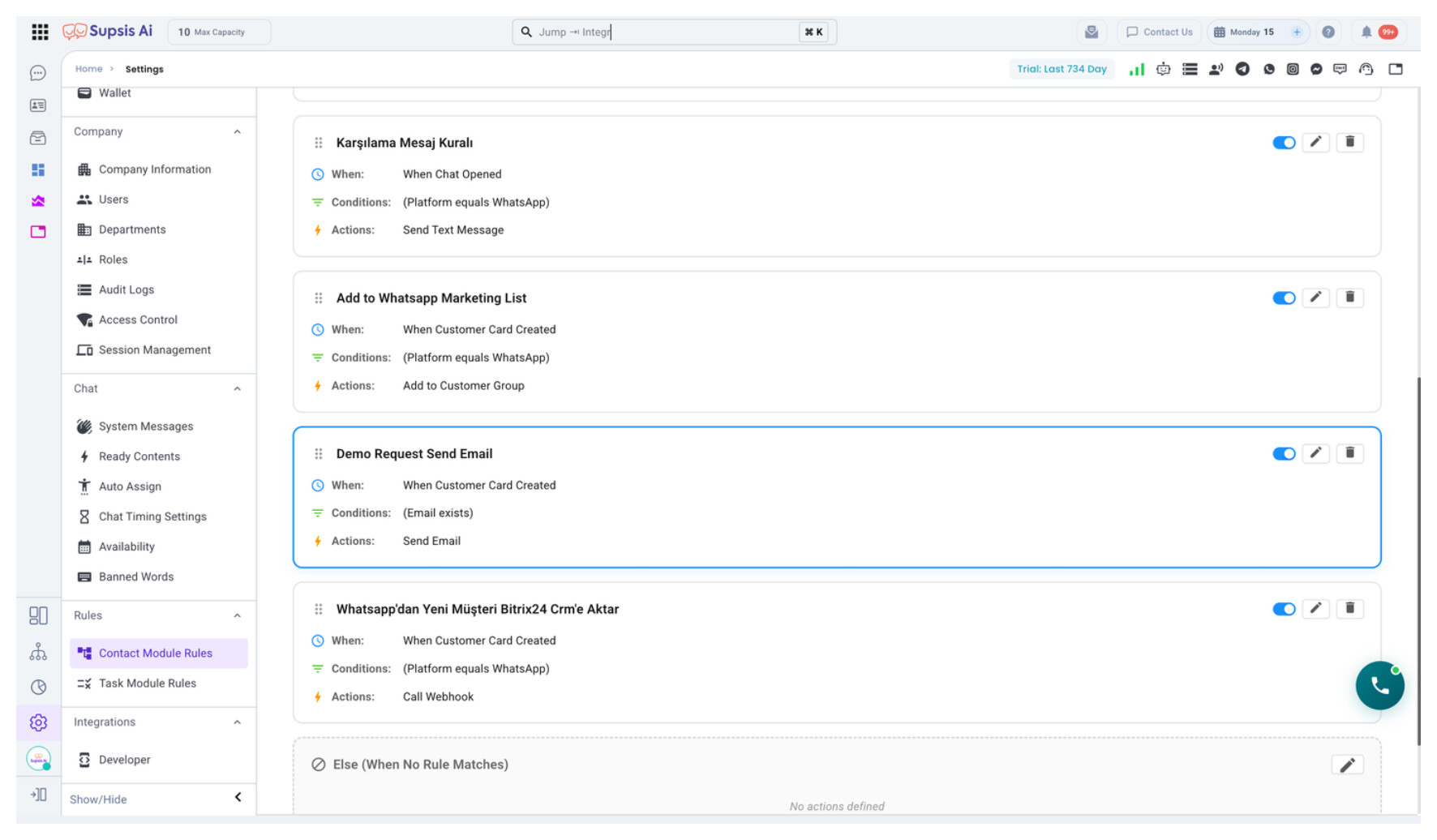
Bu özellik hangi problemi çözer?
Supsis AI; canlı destek, WhatsApp, Instagram, Messenger, Telegram, LinkedIn, web chat, chatbot ve müşteri yönetimi taraflarını tek panelde bir araya getirir. Ancak her işletmenin çalışma şekli farklıdır.
Bir işletme gelen herkese karşılama mesajı göndermek ister. Başka bir işletme sadece WhatsApp’tan gelenleri satış ekibine dağıtmak ister. Bir diğeri mesai dışında gelenleri chatbot’a yönlendirmek, spam yazanları engelleme listesine almak veya yeni lead’i CRM tablosuna kaydetmek ister.
Kişi Modülü Kuralları bu farkı kapatır. Her işletme kendi operasyon kuralını kod yazmadan kurabilir.
Hangi anlarda çalışabilir?
Kuralın ilk adımı When seçimidir. Şu iki temel senaryo çok sık kullanılır:
When: Contact Created
Yeni bir kişi oluştuğunda çalışır. Örneğin WhatsApp’tan ilk kez yazan bir müşteri, web chat’te form bırakan bir ziyaretçi veya Instagram’dan gelen yeni bir kişi için uygundur.
When: Chat Opened
Bir sohbet açıldığında çalışır. Karşılama mesajı, mesai dışı chatbot yönlendirme, sahibi offline olan konuşmayı başka temsilciye aktarma gibi senaryolarda idealdir.
Hangi koşulları kullanabilirsiniz?
Koşullar sayesinde kural herkese değil, sadece istediğiniz kişilere uygulanır.
Örnekler:
If: Kişinin Platformu equals WhatsApp
If: Kişinin Sahibi Var mı equals Hayır
If: Kişinin Sahibi Online mı equals Hayır
If: Son Konuşma İlk Mesajı contains fiyat
If: Son Konuşma Kanalı equals Instagram
If: Şu An Saat greater than 18
Yeni eklenen ilk mesaj koşulları özellikle faydalıdır. Çünkü müşterinin konuşmayı hangi kanaldan başlattığını, ilk mesajda ne yazdığını ve sohbeti kimin başlattığını kullanarak daha akıllı kararlar verebilirsiniz.
Örneğin ilk mesajında “fiyat”, “demo” veya “teklif” geçen bir kişiyi satış ekibine; “arıza”, “destek” veya “çalışmıyor” yazan bir kişiyi destek ekibine yönlendirebilirsiniz.
Yeni aksiyonlarla neler yapılabilir?
Kişi Modülü Kuralları artık sadece kişiye etiket eklemek veya sahip atamakla sınırlı değil. Yeni aksiyonlarla operasyonun büyük kısmını otomatikleştirebilirsiniz.
Kullanılabilecek aksiyonlardan bazıları:
-
Kişiye otomatik metin mesajı gönderme
-
Kişiyi online temsilcilere adil şekilde sahiplendirme
-
Kişiyi suppression listesine ekleme veya listeden çıkarma
-
WhatsApp müşteri grubuna ekleme veya gruptan çıkarma
-
Otomatik e-posta gönderme
-
Dış sistemlere webhook çağrısı yapma
-
Supsis Tablolar’a kayıt ekleme, güncelleme veya silme
-
Sohbeti cevaplandı olarak işaretleme
-
Sohbeti chatbot’a yönlendirme
Bu aksiyonlar birlikte kullanıldığında daha güçlü hale gelir. Örneğin yeni bir WhatsApp lead’i geldiğinde aynı kural içinde kişiye etiket ekleyebilir, satış ekibinden online bir temsilciye atayabilir, Supsis Tablolar’a kayıt açabilir ve müşteriye otomatik karşılama mesajı gönderebilirsiniz.
Örnek akış: Yeni lead satış ekibine düşsün
When: Contact Created
If:
  Kişinin Platformu equals WhatsApp
  AND Son Konuşma İlk Mesajı contains demo
Action 1: Add tag -> Demo Talebi
Action 2: Change owner -> Online temsilciler arasından en az kişiye sahip olana ata
Action 3: Add table record -> Lead tablosuna kayıt oluştur
Action 4: Send text message -> Merhaba {{contact.fullname}}, demo talebinizi aldık. Satış ekibimiz birazdan size yardımcı olacak.
Bu senaryoda ekip manuel kontrol yapmak zorunda kalmaz. Müşteri beklemez, temsilci doğru kişiyi görür, CRM kaydı otomatik oluşur.
Teknik ekipler için not
Bu özellik, basit iş kurallarını API veya özel otomasyon yazmadan panelden yönetilebilir hale getirir. Daha karmaşık entegrasyonlar için webhook aksiyonu kullanılabilir. Böylece Supsis içinde başlayan bir olay CRM, ERP, Slack, özel backend veya raporlama sistemlerine taşınabilir.
Teknik olmayan ekipler ise yalnızca “ne zaman, hangi koşulda, ne yapılsın” sorularını cevaplayarak operasyonlarını kurabilir.
Kimler kullanmalı?
Bu özellik özellikle şu ekipler için çok değerlidir:
-
Satış ekipleri: lead dağıtımı, demo talepleri, hızlı dönüş
-
Destek ekipleri: mesai dışı yönlendirme, cevaplandı yönetimi, doğru departmana aktarma
-
Pazarlama ekipleri: WhatsApp broadcast grupları, segmentleme, kampanya listeleri
-
Operasyon ekipleri: CRM tabloları, webhook entegrasyonları, manuel iş yükünü azaltma
Kısaca, Kişi Modülü Kuralları Supsis AI içinde müşteri operasyonlarını daha hızlı, daha düzenli ve daha ölçülebilir hale getirir.
Supsis AI’ı kendi müşteri operasyonunuzda denemek isterseniz demo talebi bırakabilirsiniz:
Ücretsiz olarak Supsis Ai hesabı oluşturmak için tıklayınız
Build Smart Customer Flows Without Coding Using Contact Module Rules
Customer conversations in Supsis AI often move fast: someone starts a web chat, a new WhatsApp lead arrives, a customer asks for pricing on Instagram, an after-hours support request comes in, or a new sales opportunity is created.
At that moment, the important question is simple: what should happen to this contact first?
Previously, many of these flows required API knowledge, Supsis automation packages, or developer support. With the new actions added to Contact Module Rules, many daily business rules can now be configured directly from the panel.
The logic is simple:
When: When should it run?
If: Under which conditions?
Action: What should it do?
For example:
When: Chat Opened
If: no condition
Action: Send text message
Message: Hello {{contact.fullname}}, welcome to our support line. One of our agents will help you shortly.
That’s it. When the rule is active, the chat opens, conditions are checked, and the action runs automatically.
Contact Module Rules overview
What problem does this solve?
Supsis AI brings live chat, WhatsApp, Instagram, Messenger, Telegram, LinkedIn, web chat, chatbot, and customer management into one panel. But every business works differently.
One company may want to send a greeting message to every new conversation. Another may want only WhatsApp leads to be assigned to sales. Another may want after-hours chats to go to a chatbot, spam contacts to be added to a suppression list, or new leads to be saved into a CRM table.
Contact Module Rules make this possible without custom code.
When can rules run?
The first step is choosing When.
When: Contact Created
Runs when a new contact is created. This is useful for a first-time WhatsApp message, a web chat form submission, or a new Instagram contact.
When: Chat Opened
Runs when a conversation is opened. This is ideal for greeting messages, after-hours chatbot routing, or reassigning a chat when the current owner is offline.
Which conditions can you use?
Conditions make the rule run only for the contacts you choose.
Examples:
If: Contact Platform equals WhatsApp
If: Contact Owner Exists equals No
If: Contact Owner Is Online equals No
If: Last Conversation First Message contains pricing
If: Last Conversation Channel equals Instagram
If: Current Hour greater than 18
The new first-message conditions are especially useful. You can use the first message text, source channel, and who started the conversation to make smarter routing decisions.
For example, if the first message contains “pricing”, “demo”, or “quote”, you can route it to sales. If it contains “issue”, “support”, or “not working”, you can route it to support.
What can the new actions do?
Contact Module Rules are no longer limited to adding tags or assigning owners. The new actions help automate a much larger part of your operation.
You can:
-
Send an automatic text message
-
Assign contacts fairly to online agents
-
Add or remove contacts from suppression lists
-
Add or remove contacts from WhatsApp customer groups
-
Send automated emails
-
Call external webhooks
-
Add, update, or delete Supsis Table records
-
Mark conversations as answered
-
Forward conversations to a chatbot
These actions become even stronger together. For example, when a new WhatsApp lead arrives, you can tag the contact, assign it to an online sales agent, create a Supsis Table record, and send a greeting message in the same flow.
Example flow: send a new lead to sales
When: Contact Created
If:
  Contact Platform equals WhatsApp
  AND Last Conversation First Message contains demo
Action 1: Add tag -> Demo Request
Action 2: Change owner -> Assign to the online agent with the fewest contacts
Action 3: Add table record -> Create a lead record
Action 4: Send text message -> Hello {{contact.fullname}}, we received your demo request. Our sales team will help you shortly.
In this scenario, the team does not need to check manually. The customer does not wait, the right agent sees the contact, and the CRM record is created automatically.
Note for technical teams
This feature moves common business rules from custom API scripts into a manageable panel. For more advanced integrations, the webhook action can push events from Supsis into a CRM, ERP, Slack, custom backend, or reporting system.
Non-technical teams can simply answer three questions: when should it happen, under which conditions, and what should be done?
Who should use it?
This feature is especially valuable for:
-
Sales teams: lead distribution, demo requests, fast response
-
Support teams: after-hours routing, answered status, department routing
-
Marketing teams: WhatsApp broadcast groups, segmentation, campaign lists
-
Operations teams: CRM tables, webhook integrations, reduced manual work
In short, Contact Module Rules make customer operations inside Supsis AI faster, cleaner, and more measurable.
You can request a demo to see Supsis AI in your own customer operation: