Gelen Müşterileri Online Temsilcilere Adil Şekilde Dağıtma
Canlı destek ve satış ekiplerinde en sık yaşanan problemlerden biri müşteri dağılımıdır. Bazı temsilciler çok fazla müşteri alırken bazıları boş kalabilir. Daha önemlisi, müşteri offline bir temsilciye düşerse cevap süresi uzar ve satış fırsatı kaçabilir.
Kişi Modülü Kuralları içindeki Change owner aksiyonu ile yeni kişileri veya yeni açılan sohbetleri online temsilcilere otomatik dağıtabilirsiniz. Üstelik bunu sadece belirli kanal, departman veya koşullar için çalıştırabilirsiniz.
Bu senaryo özellikle satış ekipleri için çok değerlidir: gelen müşteri doğrudan online olan satış temsilcisine atanır. Sahiplendirme yapıldığı için ekipler birbirinin müşterilerini gereksiz yere görmez, müşteri de beklemez.
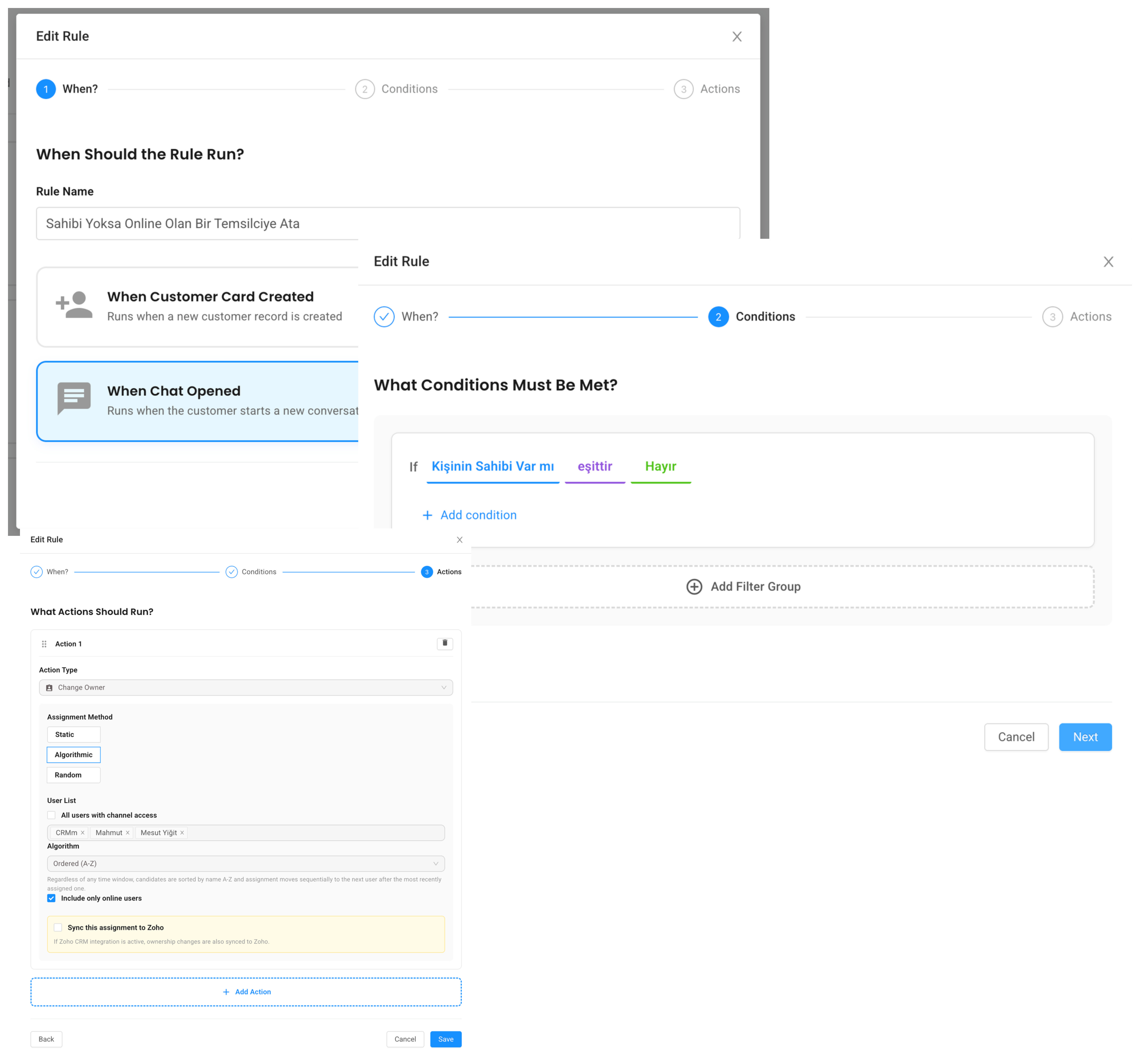
Use case 1: Yeni kişi oluştuğunda online temsilciye ata
Bu kural yeni kişi oluştuğu anda çalışır.
When: Contact Created

If:

Kişinin Sahibi Var mı equals Hayır

Action: Change owner

Method: Algorithmic

Algorithm: Least contact

Check online status: Enabled

Use visibility control: Enabled
Bu ayarda sistem önce uygun temsilcileri bulur. Online olmayanları eler. Sonra en az kişiye sahip olan temsilciyi seçer ve kişiyi ona atar.
Use visibility control aktifse, kanal görünürlüğü de dikkate alınır. Yani WhatsApp satış kanalına sadece satış ekibi bakıyorsa, müşteri destek ekibine değil satış ekibindeki uygun temsilcilere dağıtılır.
Use case 2: Chat açıldığında sahibi offline ise başka online temsilciye aktar
Bazı durumlarda kişi daha önce bir temsilciye atanmış olabilir. Ancak müşteri tekrar yazdığında o temsilci offline olabilir. Bu durumda konuşmayı bekletmek yerine online bir temsilciye devretmek daha doğru olabilir.
Kural şöyle kurulabilir:
When: Chat Opened

If:

Kişinin Sahibi Var mı equals Evet

AND Kişinin Sahibi Online mı equals Hayır

Action: Change owner

Method: Algorithmic

Algorithm: Least contact

Check online status: Enabled

Use visibility control: Enabled
Bu akışta müşteri eski sahibinin online olmasını beklemez. Sistem uygun online temsilciyi bulur ve sohbeti ona verir.
Use case 3: Sadece satış mesajlarını satış ekibine dağıt
Yeni ilk mesaj koşulu sayesinde müşterinin yazdığı ilk mesajı kontrol edebilirsiniz.
When: Chat Opened

If:

Son Konuşma İlk Mesajı contains fiyat

OR Son Konuşma İlk Mesajı contains demo

OR Son Konuşma İlk Mesajı contains teklif

Action: Change owner

Method: Algorithmic

Algorithm: Least contact

Check online status: Enabled

Use visibility control: Enabled
Böylece “fiyat alabilir miyim?”, “demo istiyorum”, “teklif verir misiniz?” gibi mesajlar satış ekibine yönlenir.
Destek talepleri için ayrı bir kural kurulabilir:
When: Chat Opened

If:

Son Konuşma İlk Mesajı contains destek

OR Son Konuşma İlk Mesajı contains hata

OR Son Konuşma İlk Mesajı contains çalışmıyor

Action: Change owner

Method: Algorithmic

Algorithm: Least contact

Check online status: Enabled

Use visibility control: Enabled
Dağıtım yöntemleri nasıl düşünülmeli?
Kişi Modülü Kuralları sahiplendirme aksiyonunda farklı yöntemler kullanılabilir.
Static yöntemi, kişiyi her zaman belirli bir temsilciye verir. VIP müşteri yöneticisi veya tek sorumlu kişi olan süreçlerde mantıklıdır.
Random yöntemi, uygun temsilciler arasından rastgele seçim yapar. Küçük ekiplerde hızlı ve basit bir dağıtım sağlar.
Algorithmic yöntem, operasyonel olarak daha güçlüdür. En az kişiye sahip temsilciyi seçebilir veya sıralı dağıtım mantığıyla çalışabilir. Online durum kontrolüyle birlikte kullanıldığında müşteriler daha dengeli ve hızlı cevap alır.
Neden sahiplendirme önemli?
Sahiplendirme sadece “kime atandı” bilgisinden ibaret değildir. Operasyon düzeni sağlar.
Müşteri bir temsilciye atandığında sorumluluk netleşir. Ekipler aynı müşteriye aynı anda müdahale etmez. Satış ekiplerinde lead sahipliği korunur. Destek ekiplerinde takip kaçmaz. Yöneticiler kimin kaç müşteriyle ilgilendiğini daha rahat izler.
Ayrıca görünürlük kurallarıyla birlikte kullanıldığında herkes her müşteriyi görmek zorunda kalmaz. Bu da özellikle büyük ekiplerde panel kalabalığını azaltır.
Önerilen kurgu
Birçok işletme için iki kural birlikte çok iyi çalışır:
Rule 1

When: Contact Created

If: Kişinin Sahibi Var mı equals Hayır

Action: Online uygun temsilciye ata
Rule 2

When: Chat Opened

If: Kişinin Sahibi Online mı equals Hayır

Action: Online uygun temsilciye yeniden ata
İlk kural yeni müşteriyi doğru kişiye verir. İkinci kural ise zaman içinde offline kalan sahiplerden dolayı müşterinin beklemesini engeller.
Özet
Online temsilciye otomatik sahiplendirme, müşteri bekleme süresini azaltır ve ekip içi dağılımı daha adil hale getirir. Satışta sıcak lead’lerin kaçmasını, destekte konuşmaların sahipsiz kalmasını engeller.
Supsis AI ile bu dağıtım akışını kendi ekibinizde denemek isterseniz demo talebi bırakabilirsiniz:
Distribute Incoming Customers Fairly to Online Agents
One of the most common problems in live support and sales teams is customer distribution. Some agents receive too many customers while others stay idle. More importantly, if a customer is assigned to an offline agent, response time increases and a sales opportunity may be missed.
With the Change owner action in Contact Module Rules, you can automatically assign new contacts or newly opened chats to online agents. You can also limit this behavior by channel, department, or any condition you choose.
This is especially valuable for sales teams: the incoming customer is assigned directly to an online sales agent. Since ownership is set, agents do not unnecessarily see each other’s customers, and the customer does not wait.
Use case 1: assign a new contact to an online agent
This rule runs when a new contact is created.
When: Contact Created

If:

Contact Owner Exists equals No

Action: Change owner

Method: Algorithmic

Algorithm: Least contact

Check online status: Enabled

Use visibility control: Enabled
With this setup, the system first finds eligible agents. It filters out offline agents. Then it selects the agent with the fewest contacts and assigns the contact to that agent.
If Use visibility control is enabled, channel visibility is also respected. For example, if only the sales team can see the WhatsApp sales channel, the customer is distributed to eligible sales agents, not to the support team.
Use case 2: reassign a chat when the owner is offline
Sometimes a contact may already have an owner. But when the customer writes again, that owner may be offline. Instead of making the customer wait, the conversation can be transferred to an online agent.
The rule can be configured like this:
When: Chat Opened

If:

Contact Owner Exists equals Yes

AND Contact Owner Is Online equals No

Action: Change owner

Method: Algorithmic

Algorithm: Least contact

Check online status: Enabled

Use visibility control: Enabled
In this flow, the customer does not wait for the old owner to come online. The system finds an eligible online agent and assigns the chat.
Use case 3: route only sales messages to sales
With the new first-message condition, you can check what the customer wrote first.
When: Chat Opened

If:

Last Conversation First Message contains pricing

OR Last Conversation First Message contains demo

OR Last Conversation First Message contains quote

Action: Change owner

Method: Algorithmic

Algorithm: Least contact

Check online status: Enabled

Use visibility control: Enabled
This routes messages like “can I get pricing?”, “I want a demo”, or “can you send a quote?” to sales.
You can create a separate rule for support requests:
When: Chat Opened

If:

Last Conversation First Message contains support

OR Last Conversation First Message contains error

OR Last Conversation First Message contains not working

Action: Change owner

Method: Algorithmic

Algorithm: Least contact

Check online status: Enabled

Use visibility control: Enabled
How should assignment methods be used?
The ownership action supports different assignment methods.
Static always assigns the contact to a specific agent. This works well for VIP account managers or processes with one responsible person.
Random selects a random eligible agent. It is simple and fast for small teams.
Algorithmic is stronger operationally. It can choose the agent with the fewest contacts or work with an ordered distribution logic. When combined with online status checking, customers get faster and more balanced responses.
Why does ownership matter?
Ownership is not just a field that says “assigned to”. It creates operational clarity.
When a customer is assigned to an agent, responsibility becomes clear. Agents do not step on each other’s conversations. Sales ownership is protected. Support follow-up is not missed. Managers can see workload more clearly.
When combined with visibility rules, not everyone has to see every customer. This reduces panel noise, especially in larger teams.
Recommended setup
For many businesses, two rules work very well together:
Rule 1

When: Contact Created

If: Contact Owner Exists equals No

Action: Assign to an eligible online agent
Rule 2

When: Chat Opened

If: Contact Owner Is Online equals No

Action: Reassign to an eligible online agent
The first rule assigns new customers correctly. The second rule prevents customers from waiting when their previous owner is offline.
Summary
Automatic assignment to online agents reduces customer waiting time and makes team distribution fairer. It helps sales teams avoid missed hot leads and support teams avoid ownerless conversations.
You can request a demo to try this distribution flow with your own team: